Your home for learning Conversely, from sending your first message to workflow automation

View Survey Analytics

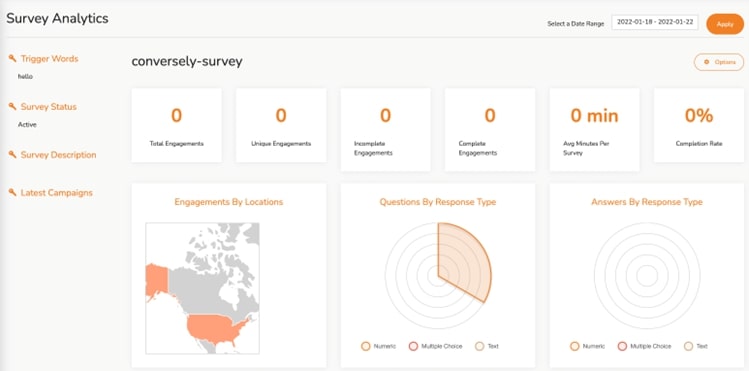
With Survey Analytics, you can gain useful insights on how the survey is performing. For instance, you can gain insight on the number of engagements, or responses to questions.

Procedure

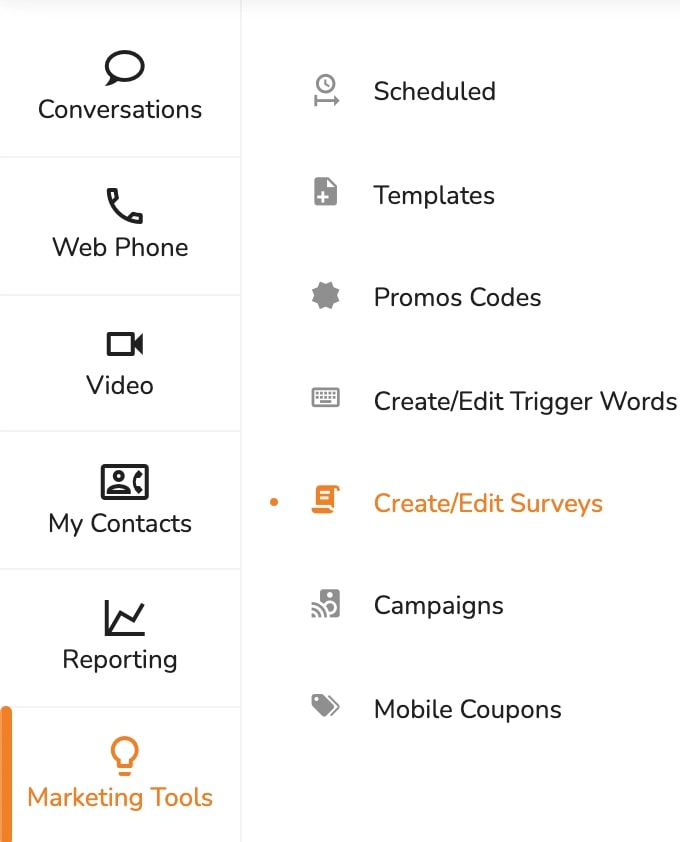
  • Click Marketing Tools
  • Click Create/Edit Surveys
#

  • Go to the survey you want to edit and click Options
  • Click View Analytics
  • You can also Click Download All Responses (.csv) for a quick report.
#

  • To see the Analytics from a specific Date Range, Click on Select a Date Range field.
  • Choose dates from the provided calendar and Click Apply
  • To Download a Report Click Options then Download Report
  • To Download Responses to survey Click Options then Download All Responses (.csv)
  • Click on Save Survey.


View Survey Analytics

With Survey Analytics, you can gain useful insights on how the survey is performing. For instance, you can gain insight on the number of engagements, or responses to questions.

Procedure

  • Click Marketing Tools
  • Click Create/Edit Surveys
#

  • Go to the survey you want to edit and click Options
  • Click View Analytics
  • You can also Click Download All Responses (.csv) for a quick report.
#

  • To see the Analytics from a specific Date Range, Click on Select a Date Range field.
  • Choose dates from the provided calendar and Click Apply
  • To Download a Report Click Options then Download Report
  • To Download Responses to survey Click Options then Download All Responses (.csv)
  • Click on Save Survey.


Go Back

Get more clients using Conversely